Monday, 2 December 2013

Task 3

Having designed your database structure, populate the tables by entering example data that satisfies the validation rules.Provide annotated screenshots to show how you have done this. (P3) Deadline 5th October
LO(P3): Understand how to create and populate a database.
You have been provided with data in the form of text files containing details of members, payments, films and reviews.
Import this data and populate you database tables using append queries. Show that you have done this successfully by providing annotated screenshots of the steps you take, and of the populated tables in datasheet view. (M2) Deadline 8thOctober.
LO(M2): Learn how to import data from an external source into your database.


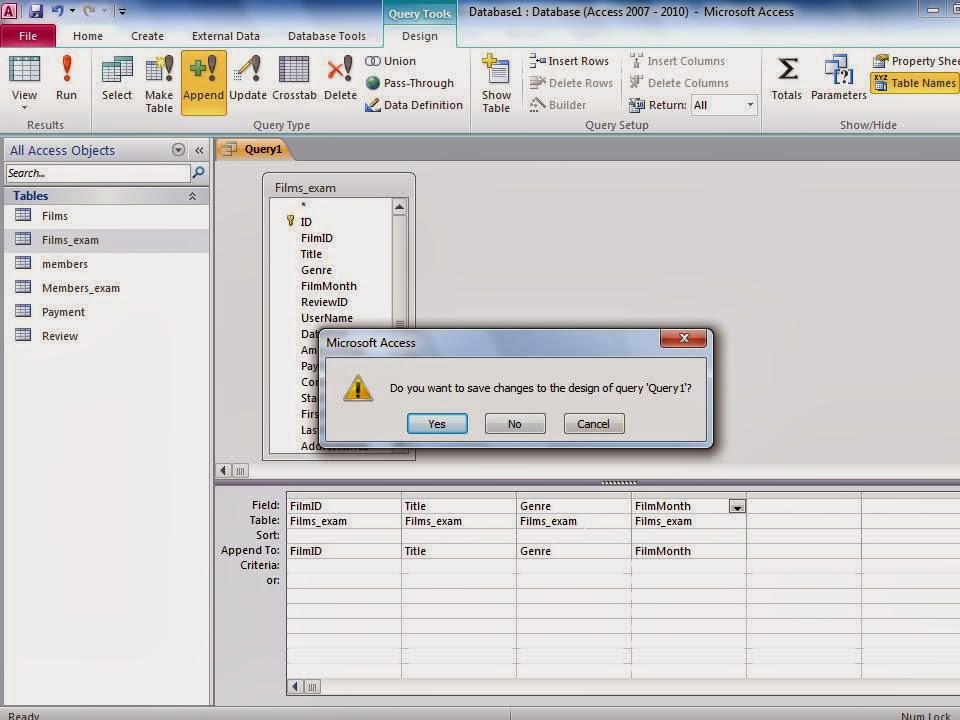
this is creating a query for films in this section i will pick the fields that correspond to the table


with the query created the data is linked to the matching fields so now i have the information needed in the table


for this query i am taking the information from the members_exam table to append the data to the members table


this is the query with the chosen fields selected now i will append this data to the members table


this is a validation rule on microsoft access that wants me to confirm that appending the data is what i want to do


this is the members table with all of the information in it now i have both the films and members tables with the data in them


Monday, 25 November 2013

P4


this is me starting to make my form for the database this will be what people see and what is the face to the data base so this will need to be easy to navigate and simple so people will know were to put the information that will be added to my database


i opened the field list so i would be able to see the fields that i wanted on my form


i selected the fields for my form from this list i double clicked them so they would be added to my form


after they were all selected they were now on my form so this will be the way people put the information into my database


i unbound the boxes so the information can be put in them and go to the correct place


this box has the code that will make my table recognize the age of someone so this means that my append query will know if someone is under the required age this will make the database rejects or accept someone depending on there age


Wednesday, 9 October 2013

Screenshots


in this screenshot it shows me making my members table with 10 diffrent field in it these tables are made from creating a new table and going through each field and writing the name for each of the top this will give you the space to input your data


   this screenshot shows me making my films table with 4 different field in it


this one shows me making the review table with 6 fields in it


in this one it is the payment table that has 4 fields in it


this shows the relationships between the different tables and how the same field in each table links to each other this is what connects the tables


this shows me setting the DOB validation rule this makes it so anyone under the age of 15 will be rejected


this is the validation text that pops up to tell you that you have to be over the age of 15 to use this service this helps stop you from having invalid or null values in a table


this is the data from the word document that had all of the data for our table and this is the process of importing that data to the members table


this is all of the data that was imported into the table so now the members table is full of data


this is creating a query for films in this section i will pick the fields that correspond to the table


for this one i was doing the films table so the query contained the corresponding tables


with the query created the data is linked to the matching fields so now i have the information needed in the table


for this query i am taking the information from the members_exam table to append the data to the members table


this is the query with the chosen fields selected now i will append this data to the members table


this is a validation rule on microsoft access that wants me to confirm that appending the data is what i want to do


this is the members table with all of the information in it now i have both the films and members tables with the data in them


this is me starting to make my form for the database this will be what people see and what is the face to the data base so this will need to be easy to navigate and simple so people will know were to put the information that will be added to my database


i opened the field list so i would be able to see the fields that i wanted on my form


i selected the fields for my form from this list i double clicked them so they would be added to my form


after they were all selected they were now on my form so this will be the way people put the information into my database


i unbound the boxes so the information can be put in them and go to the correct place


i added the rule for username this made it so it would take the first 3 letters from the left of the first name and the first 2 letters from the left on the last name and then it adds a number thats numerical value goes up by one each time


this box has the code that will make my table recognize the age of someone so this means that my append query will know if someone is under the required age this will make the database rejects or accept someone depending on there age


in this i am making a new query for the form so i will be able to have the information go to the correct places


this is the queries that will take the information from multiple tables and will show the selected fields so we will be able to get the information that we require 


this shows the selected fields from the tables and how i was able to choose the fields from the tables with the information that i required


this is what happened after i ran the querie this shows all of the fields that were required so now you can see all the information for a selected movie so you can see everything that could help you decide if you want to get that movie

Friday, 6 September 2013

D1

common errors in databases 

there are many errors in databases that are common to come across these include thing like null values incorrect data types deleting fields renaming incorrectly and validation any one of these could stop your database in its tracks and all of them are easy to avoid if you concentrate on what you are putting into the database for example you could stop the database by having a column called "films" and everything messes up because you have have the database looking for the file "filmz" this is a simple mistake that could cost you dearly.

null values 

null values are when you have a field in a database that requires information to function but there is no information there the  information is equal to 0 and can not be compared to any other information an example of this is when you are signing up to a website and on this website you have to fill out your name your age and the country you live in but you only fill out the name and age the program will not let you continue because you need to fill out all of the required values.


deleting fields

if you delete a field it will cause an error and format the table because the information required will not be there this is similar to a null value this is a problem that could cause you to restart you database if you do not have a back up because of the damage it can do to the database so it is important to make sure you have back ups of the data because this way if anything goes wrong you will be able to back track a few steps instead of all the way back to the beginning 


incorrect data types

an incorrect data type can also stop your database from functioning because if you have numbers that you are calculating with and you only set there type as text then the database will not calculate those numbers this is the same as if you have numbers you are not calculating with you are just using as more of a way to track your data and you use these numbers as numbers then your database will try to calculate these numbers that are not included in the database 


validation 

validation is the rules that the computer preforms as data is being entered into the database  it will check the data against the set of rules you are able to apply these rules during the setup of the development stage of making your database but if you apply rules that are not specific enough they will not work therefore stopping your database and example of this would be on games like fifa they will match you with someone who is the same level as you this means that they take your level and put it in a database and the rule would be to group your account with other accounts with the same values on the level column 


M1

Referential integrity


Ref Integrity

from what i understand of referential integrity it is when you have all of the data required of a relation
what this does is it stops you putting any null values into the database or it will not function properly
for example when you sign up for an email account you need to fill out all of the boxes such as name and date of birth and alternative email address if any of these boxes are not filled out it will bring up an error message that will stop you from continuing with the information and will ask you to fill out the missing information and will often state "all fields are required" this means that you will need to go back and fill out the null values because if there is a null value in a database then it would not function properly


Primary key

there are different keys such as primary and foreign keys the primary keys are for keeping track of data when there is more that one piece of data that is similar for example in the library they will have multiple poppies of the same book but they still need to catalog them differently so they will use what i believe to be a bibliographic catalog this means that they will have 10 copies of Alice adventure in wonderland and these ten books will all have the same key such as ZTUE and then they will have a number so the books would go from ZTUE01 to ZTUE10 this is one of the earliest and forms of a database but using the primary keys means that you can keep track of multiples of the same data


Foreign key

the foreign key is the data that is in the columns this is the data that is used to connect the data and show the relationships between it for example on IMDB you can look at a movie and look at the actors that are in that movie and from there you can look at what others movies they have been in this is how you move from one column to another using the relationships between the foreign keys